One portal to rule them all
Cloudflare shipped MCP server portals — Access as the OAuth provider, one login for all your own and third-party MCPs. When it saves your day, when it doesn't, and what the pattern asks for in return.
A couple of months ago I stopped right before adding OAuth to my third self-hosted MCP server.
I had five of them running on my K3s cluster: brain (deprecated, another story), storage, source-fetchers, argocd, kubernetes. For each one, the same mental ceremony: register the app, expose /.well-known/oauth-authorization-server, support DCR (Dynamic Client Registration), implement /authorize, /token, refresh tokens, JWT validation, session store. Multiplied by five MCPs of my own and however many came next, it was a pattern that hurt before I'd written it.
Before showing you the code, worth flagging why this matters more today than six months ago. When an agent like Claude connects to a remote MCP server, OAuth is the auth standard the client expects. If you want your agent to reach services that don't have a Remote MCP of their own — and there are still many — you'll be writing the server yourself. And with the server comes the OAuth. Six months ago that was optional; today, if the MCP server lives on the public internet, it's the minimum bar.
I decided not to write the OAuth dance. What I tried instead became my default, and a couple of months later Cloudflare put an official name on the feature: MCP server portals.
The problem, in code
To anchor the idea, two files from the same ecosystem.
The first is the entire auth layer of mcp-linkedin, my only self-hosted MCP that does implement OAuth from scratch (I explain why later):
src/oauth/
├── jwt.ts          78 lines    — HS256 sign/verify, typ guards (access vs refresh)
├── linkedin.ts    105 lines    — LinkedIn-side OAuth (authorize URL, token exchange, refresh)
├── provider.ts    290 lines    — OAuthServerProvider from the SDK: authorize, callback, token, refresh
└── stores.ts      129 lines    — In-memory ClientsStore + SessionsStore + TokensStore
                  ─────────────
                  602 lines
And mcp-storage's, which sits behind Cloudflare Access:
// src/auth.ts — 17 lines (the 10 that matter highlighted)

export function cloudflareAccessAuth(headers: Headers): void {
  if (process.env.MCP_STORAGE_DISABLE_AUTH === "1") return;
  const jwt = headers.get("cf-access-jwt-assertion");
  if (!jwt) {
    throw new Error("missing Cf-Access-Jwt-Assertion header");
  }
}
Six hundred and two lines versus seventeen. The difference isn't down to who wrote them — same repos, same style, written days apart. The difference is who implements the OAuth dance. In mcp-storage's case, Cloudflare implements it; the server itself trusts that the header arrived verified from the edge.
What's also worth noting is what's NOT in those 17 lines and is in the 602. No session store — Cloudflare carries it. No refresh-token logic — Cloudflare carries it. No claims schema of your own — you trust the claims Cloudflare already validated. No /.well-known/oauth-authorization-server, no /register, no /authorize, no /token — Cloudflare eats all that before your pod sees a request.
The discovery
While I was running this loop on my own cluster, Cloudflare was formalizing the pattern. The post names it MCP server portals:
The employee simply connects their MCP client to the MCP server portal, and the portal immediately reveals every internal and third-party MCP servers they are authorized to use.
The relevant line for me: "our monorepo template for MCP servers integrates Cloudflare Access as the OAuth provider." Same pattern, with a name.
Today my agent points at a single endpoint —https://mcp.devsprouts.com/mcp— and from there sees the self-hosted MCPs plus the third-party ones I might add later. One OAuth, several MCPs.
One thing the Cloudflare post highlights and worth underlining: the portal supports both remote MCP servers hosted on Cloudflare and third-party MCP servers hosted anywhere. Which means in practice the pattern serves you not just for your internal MCPs, but to govern your agent's access to the WHOLE toolkit you end up using — the ones you write, the ones wrapping SaaS, the ones a partner exposes for you. It goes from being "an optimization on my infra" to "the control plane for my agent's auth".
How the architecture looks
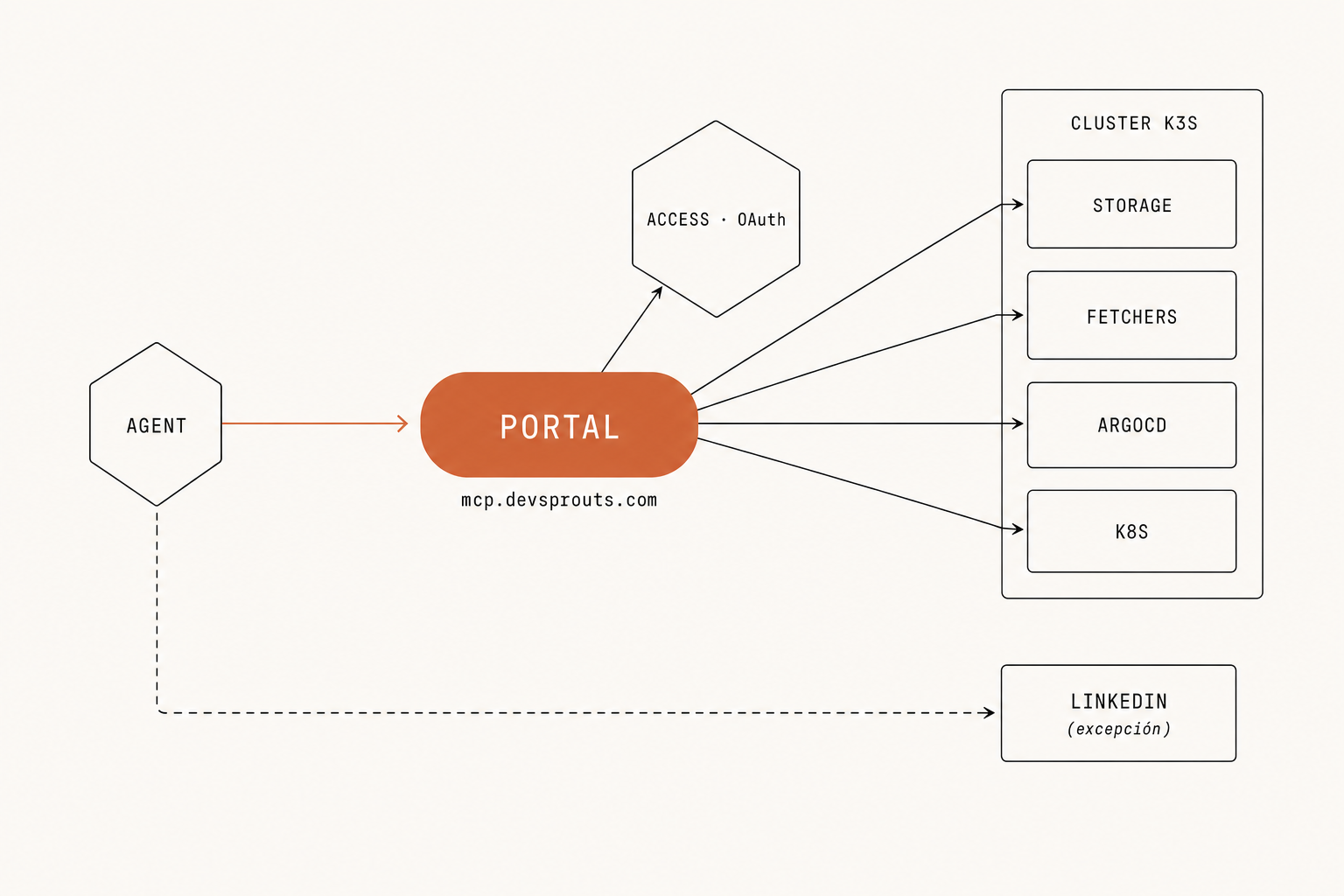
The trick is moving the auth boundary outside the MCP. The three layers:
- Cloudflare Access runs the OAuth dance (against your IdP — Google Workspace, GitHub, whatever). It issues a short-lived JWT.
- The portal routes by path to the right MCP, propagating the JWT as
Cf-Access-Jwt-Assertion. - The MCP server just checks for the header. Cloudflare already validated the signature at the edge.
From the agent's side, all of that is invisible. One browser-side login and the tools from each MCP appear in the toolkit.
The honest exception
mcp-linkedin doesn't sit behind Cloudflare Access. It's the one exception in the set, and the reason is the rule I picked up:
If the service your MCP wraps IS already the user's IdP, don't stack another IdP on top of it.
LinkedIn already does its own OAuth — the dance happens against LinkedIn directly, and the access token LinkedIn returns is the one I need to call its API. Putting CF Access on top would mean asking the user to log in twice in a row for a single interaction, with nothing gained.
For all the other self-hosted MCPs — the ones wrapping my cluster, my storage, my wiki, my fetchers — the IdP is Google Workspace, not the wrapped service. There Cloudflare Access falls naturally into place.
Quick summary of the criterion:
| Wrapped service | Natural IdP | Own OAuth? | Cf Access? |
|---|---|---|---|
| My K3s (argocd, kubernetes, grafana) | Google Workspace | No | Yes |
| My storage (R2) | Google Workspace | No | Yes |
| My wiki / fetchers | Google Workspace | No | Yes |
| Yes | No | ||
| GitHub (if I wrapped it) | GitHub | Yes | No |
| Slack (if I wrapped it) | Slack | Yes | No |
What the pattern asks for in return
None of this is free, and it's worth being honest about what you sign up for.
Local dev stops being identical to deploy. In production the Cf-Access-Jwt-Assertion header arrives validated by the edge; on your laptop the header doesn't exist. I solve it with a flag MCP_<NAME>_DISABLE_AUTH=1 that each server understands and uses to skip the check when active. That means you have two auth modes in the same code — the real one and the dev one — and if you forget to export the variable when bringing up the local pod, everything throws missing Cf-Access-Jwt-Assertion header and you lose five minutes on something that shouldn't happen.
You marry Cloudflare for that layer. It's not a deep coupling — the server calls no Cloudflare API, it just trusts a header — but if tomorrow you want to migrate to another provider (another Zero Trust, a traditional VPN, oauth-as-a-service like WorkOS), you'll rebuild how the JWT arrives and what claims it carries. Code portability is high; runtime portability less so.
The IdP you wire into Access has to be ready. If your team uses an IdP that Access doesn't support natively (some regional SSO, a quirky legacy Active Directory), you'll expose it via SAML or generic OIDC before plugging into the portal. For Google Workspace, GitHub or Azure AD setup takes minutes; exotic cases can take an afternoon.
Multi-tenancy stays outside the MCP. Because the server only checks for the header, it doesn't know who the user is. If your MCP needs per-user logic (say, each tenant only sees their own rows), you'll read the JWT claims yourself inside the handler. It's not hard — the JWT carries email and groups — but it stops being "seventeen lines of auth and done".
None of these four made me drop the pattern. But all four I discovered after adopting it, not before.
If you want to try it in your stack
Minimum viable to replicate what I have:
- A cluster where your MCPs run (I use K3s on Hetzner by preference; any cluster works). Cloudflare's portal also supports MCPs hosted directly on Cloudflare Workers — if you don't want a cluster, that's the no-infra version.
- Cloudflare Zero Trust with Access enabled. For one person or a small team, the free tier is enough.
- An IdP you already use (Google Workspace, GitHub, Azure AD — all three plug in in minutes).
- On each MCP, a
cloudflareAccessAuthfunction like the one above. Seventeen lines. That's all the code difference vs. a "public no-auth MCP".
The day a new MCP shows up that you have to write is the moment to try it. The time investment is on the order of an afternoon, not a weekend — and from that point on every new MCP inherits the auth without touching it.
Closing
The Cloudflare pattern is real and noticeable. It doesn't take ALL of the auth work off your plate — per-user logic is still yours when needed, local dev wants a flag, and the day you want to migrate off Access you'll have runtime work. But in exchange it removes the OAuth dance from the middle, gives you governance over every MCP (yours and third-party) from a single surface, and the first new MCP you write from that point on inherits the auth without you thinking about it.
One portal to rule them all.